

The CDRC Shingles vaccination system is designed to help maximise uptake of shingles vaccination whilst minimising the burden on general practice.
To use the system:
- Ensure that you have completed the Set-up steps
- Check Immunosuppressed and Contraindicated patients
- Consider adding PSDs to eligible patients’ records
- Ensure that you have read and understood the Patient Identification mechanism and considered excluding any patients that should not be vaccinated/including any patients that should be vaccinated
Additional Information:
- Instructions for clinicians administrating the vaccine
- Reporting is available to ensure that all appropriate activity is coded and eligible for payment for the GMS and QoF elements of shingles payments.
Set-up
Batch Numbers
It is also worth setting S1 to carry over vaccine batch numbers. The screenshots below show how to do this:
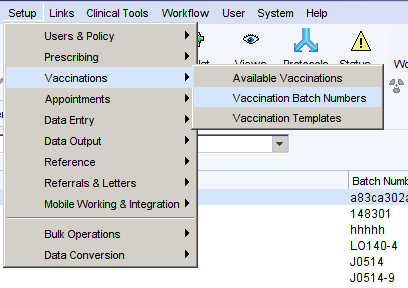
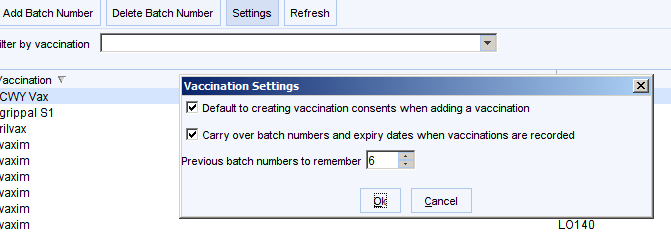
Local Vaccination Templates
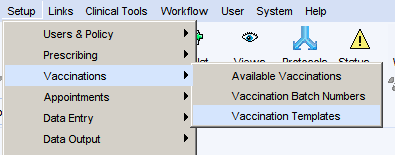
To make full use of the CDRC shingles vaccination system you will need to add some vaccination templates to your system. This cannot be done centrally.
Go to the vaccination template then click New Template and complete the template as shown below.
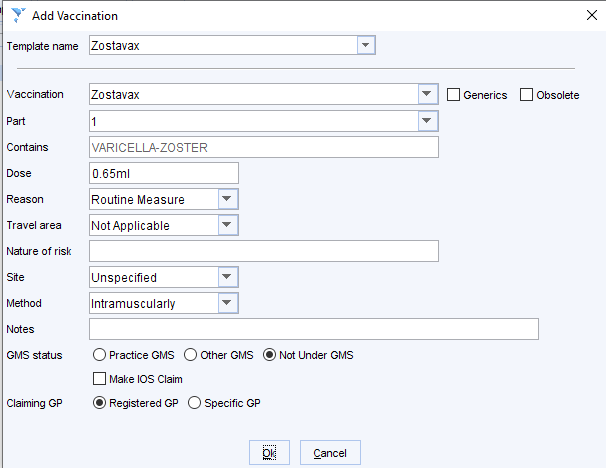
The following templates will be needed
- Template name: Zostavax
- Vaccine: Zostavax
- Method: Intramuscularly
- GMS Status: Not under GMS – this ensures it does not appear in your FP34D report
- Template name: Shingrix 1
- Vaccine: Shingrix
- Part: 1
- Method: Intramuscularly
- GMS Status: Not under GMS – this ensures it does not appear in your FP34D report
- Template name: Shingrix 2
- Vaccine: Shingrix
- Part: 2
- Method: Intramuscularly
- GMS Status: Not under GMS – this ensures it does not appear in your FP34D report
The old Varicella Zoster vaccine template can be deleted
Before Vaccination
Contraindicated or Immunosuppressed Patients

1 Shingles Vaccine – Setup 1.0 – patients who have a shingles vaccine contraindicated code in the last 12m. Consider removing this if the contraindication was due to immunosuppression – immunosuppressed patients now have the option of Shingrix vaccination.
1 Shingles Vaccine – Setup 2.0 – patients in the eligible cohort who currently appear immunosuppressed – consider reviewing this list to ensure this is correct. Add Immunosuppression resolved if the patient is no longer immunosuppressed. The system will then flag them as eligible for zostavax.
PSD
The CDRC system allows you to add a PSD to individual records. This PSD message will then be displayed on the relevant vaccination template. Only PSDs from the last 12 months will be displayed
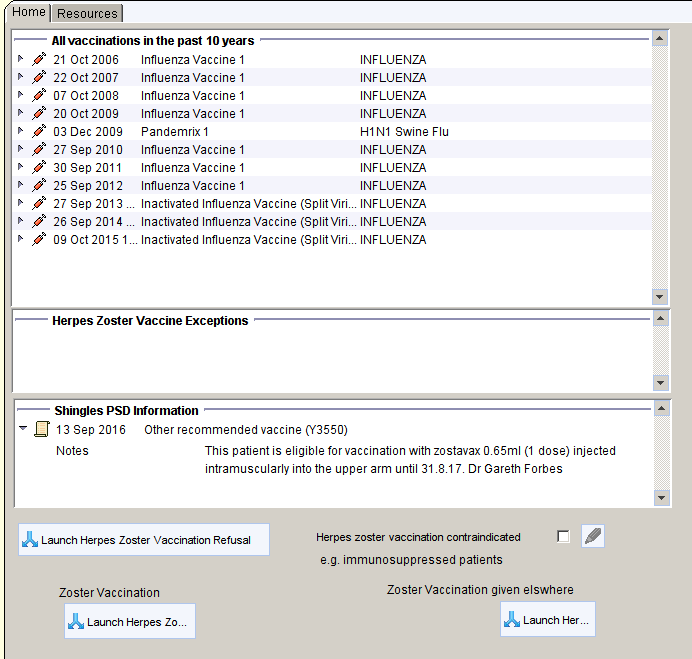
To add the PSDs:
- Navigate to the CDRC Vaccinations > Shingles Vacc > 1 Shingles Vaccine – Setup 3.1 PSD: Eligible for zostavax but no PSD
- Show the patients
- Select the patients you wish to add the PSD to (use ctrl-click to select/deselect)
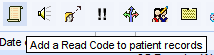
- Click on the scroll icon to add a Read code
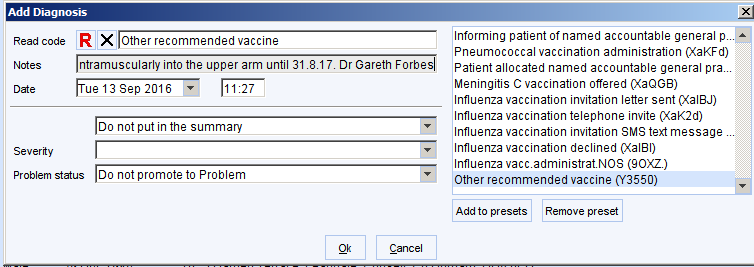
- Bulk add the code Other recommended vaccine (Y3550) using the following text: “This patient is eligible for a vaccination with [insert volume here] of [insert brand or name of vaccine here] intramuscularly into the deltoid muscle until 31.3.[year] as long as they are under 80 years of age. [Doctor’s name]”
E.g. This patient is eligible for vaccination with zostavax 0.65ml (1 dose) injected intramuscularly into the upper arm until 31.8.18. as long as they are under 80 years of age Dr Gareth Forbes
Move to the next page of results if there are more than 250 patients and repeat

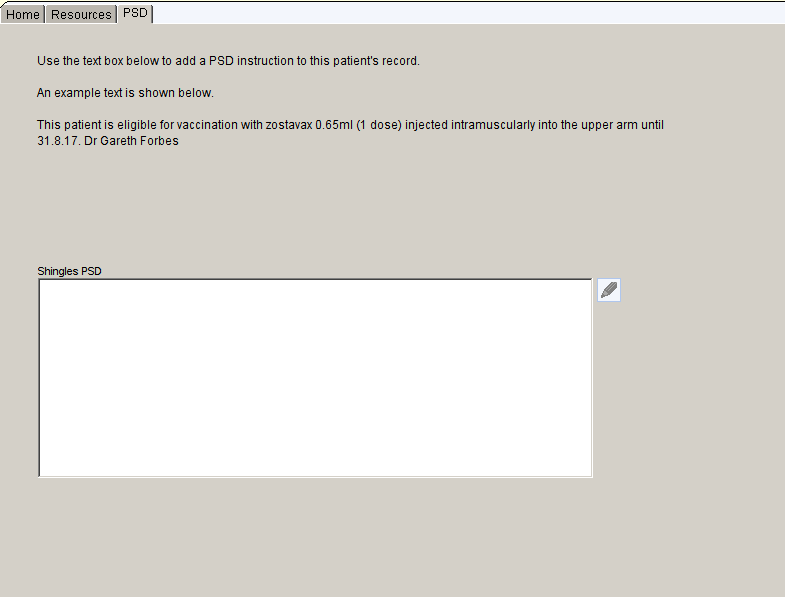
A PSD can be added to individual patient on the PSD tab of the shingles template. Ideally add the text to your presets for faster entry.
To remove a PSD, right click on the PSD Information box on the page 1 of the template and choose Mark in Error.
Keeping the Records Up to Date
To ensure that the records are kept up to date it is possible to create a batch report that alerts the clinician at set intervals of PSDs that need to be added or removed. For details on automated reporting follow this link :
Patient Identification
Patient identification for shingles vaccine is based on age alone.
Patients potentially eligible for vaccination will have the ‘Red S’ patient status alert below the demographic bar, on the home page and on the LTC Master template
Patients are excluded if:
- They have an entry of a previous shingles vaccination
- They have a record of shingles vaccination being declined or contraindicated in the last year
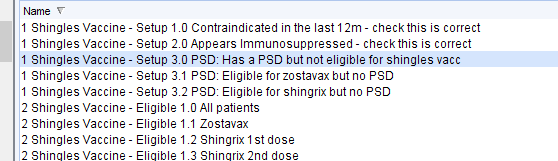
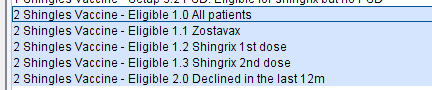
The following searches will show patients eligible for vaccination, with subreports for each different vaccine. The final search shows people who are currently excluded due to declining in the last year.
Patient Invitation
The following searches identify patients who might be eligible for shingles vaccine.

To invite all eligible patients three times each year, run 1.0 All eligible patients (not housebound) monthly and send the patient an electronic or paper invite.
Search 1.1 shows patients who haven’t responded two months after the 3rd invitation. Alternative means of contacting them might be considered
Searches 2.1 and 2.2 show housebound patients.
Special attention might be considered for those patients who are about to turn 80, who will become ineligible for vaccination soon – search 3.0
Giving the Vaccine
To administer the vaccine click on the Red S icon at the top of the screen. The Shingles Vaccine template will open and lead you through the process adding the correct Read codes.

For patients without the icon, you can launch the Shingles Vaccine template by using the search bar in the lower left-hand corner of the main page and searching for ‘ Shingles Vaccine’
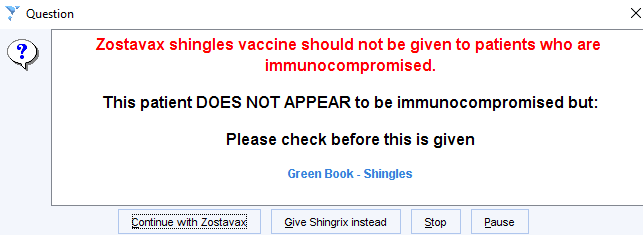
When the template is launched an alert will be displayed about immunosuppression, depending on whether the system detects that the patient is immunosuppressed.
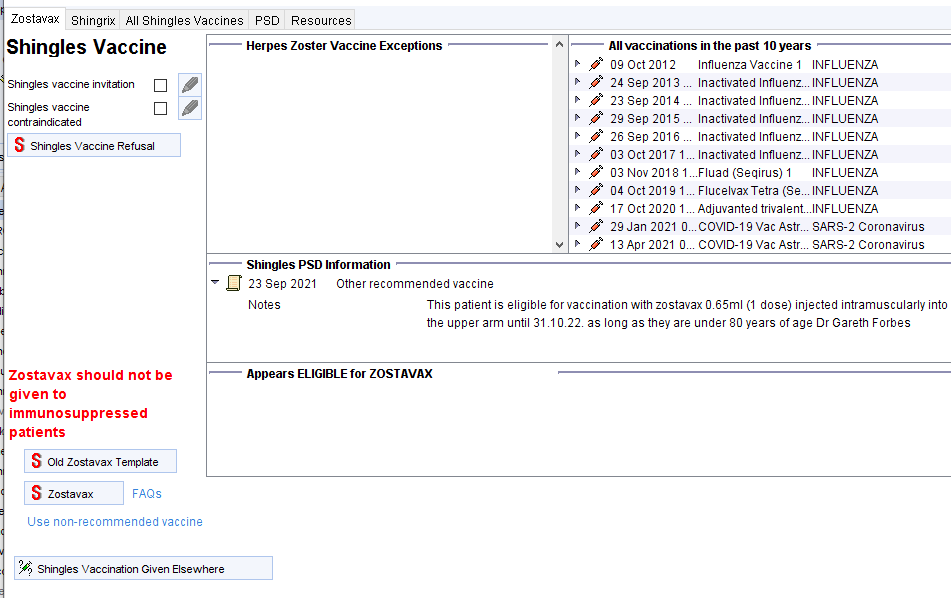
The central views will display:
- Exceptions
- Vaccines in the last 10 years
- PSD information
- Currently eligibility
- Warnings about immunosuppression
The Old Zostavax Template button will be remove at the beginning of January 2022.
The Zostavax button will only be actionable in patients who appear immunocompetent. To override this use the Use non-recommended vaccine link. Clicking this button will run a series of quality control checks before recording the vaccine. The vaccine will be recorded in such a way that it will not show on the FP34D report.
There is an equivalent tab for Shingrix.
The Shingles Vaccination Given Elsewhere button will allow recording of vaccination given in other healthcare units.
Reporting
Quality Control
Searches QC1 and 2 show patients given Shingrix which will not be reimbursed – further details can be found at Data Quality Issues Affecting Payment
QC3 identifies patients with a SNOMED code for shingles vaccine but no vaccine record in the S1 vaccine node. Add the vaccine node record to ensure the vaccine record is complete.
![Machine generated alternative text:
3 Shingles Vaccine - Invitation 3]] Patients about to turn 80
4 Shin les Vaccine- QC 1 Shin rixl vaccine but not coded immunosu ressed
4 Shingles Vaccine - QC 2 Shingrix 2 vaccine but not coded immunosuppressed
4 Shingles Vaccine - QC 3 Coded vaccine without Sl vaccine on the same date -
5 Shingles Vaccine - Performance: Proportion of eligible patients with complete course
5 Shingles Vaccine - Performance: Vaccines Given
6 Shingles Vaccine - Payment: For CORS reports see CORC Contracting > Vaccines
6 Shingles Vaccine - Payment: For OOF performance see CORC Contracting > OOF Vacc and Imms
Immunosuppression, combined (Shingles Business rules) -](https://cdrc.nhs.uk/wp-content/uploads/2022/09/image-454.png)
Performance
Overall vaccination coverage can be seen in the first performance report
The Vaccines Given report can be used to see the number of vaccines given. Use the breakdown option:
- Event Details
- Event month and year (or other appropriate timeframe)
Contract Management
For more details of contract management support to improve QoF and other performance go to Contract Management Shingles Vaccine