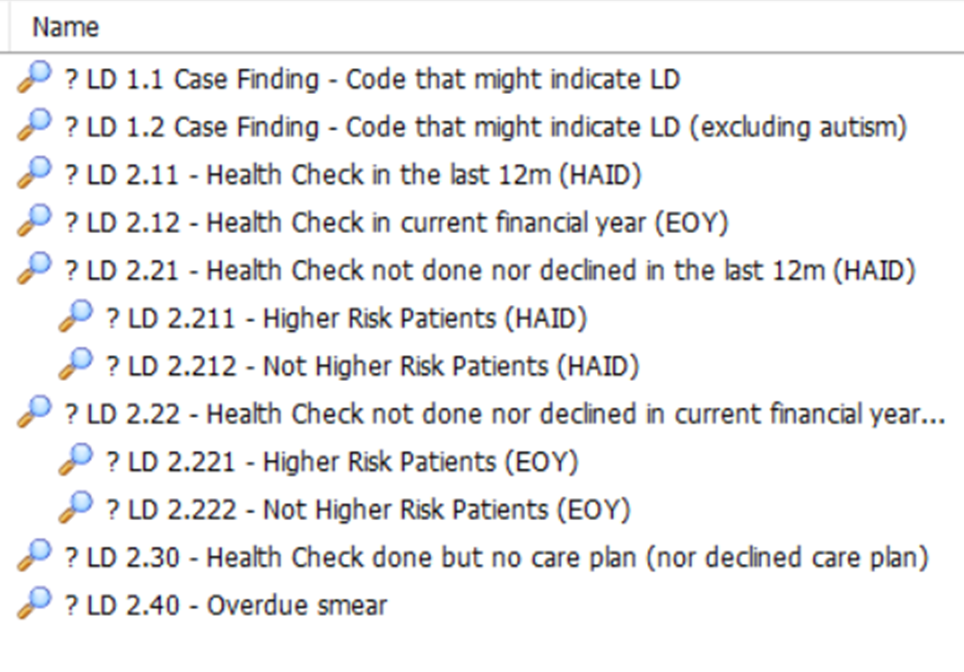
A suite of Population Reporting searches for EMIS, created by the CDRC can be to help validate your LD register and identify numbers and proportions of patients who have had/not had their annual health check.
Accessing the Populating Reporting Searches
To access the CDRC Learning Disability (LD) Population Reporting Searches on EMIS, you will need to download and import the following .zip file:
As the operator of the CDRC, Health Innovation North East and North Cumbria Limited (on behalf of itself and/or its licensors) grants you a licence to copy and download this document in accordance with our terms of use. You must not modify the content of this document in any way, and you must not use any illustrations, photographs, video or audio sequences or any graphics separately from any accompanying text. For further details, please see our terms of use (Terms of use – Clinical Digital Resource Collaborative (cdrc.nhs.uk)
If you have not performed this process before, please refer to the Download/ Import guide below, which provides you with step-by-step instructions on how to Download and Import .zip files into EMIS:
You can check whether you have the most up-to-date version by reviewing the date on the .zip file. Any updates to the Population Reporting searches will be communicated to CDRC Precision users via the mailing list for the CDRC. To ensure you stay up to date with the latest information, please sign up to the mailing list at http://eepurl.com/9131L
Guidance on the Population Reporting Searches
To view CDRC’s focused Population Reporting Learning Disability searches navigate to the CDRC Quality LD (11th November 2025) folder and open the CDRC Quality LD Focused Reports folder.


The Case Finding reports will identify patients who have a clinical code indicative of LD but the patient does not have a coded LD register code.
The Health Check reports identifies patients who have had/ had not had their Health Check.
The reports to identify patients who have yet to have a check or opt out are subdivided into reports of those likely to be at ‘higher risk’. The criteria for higher risk are:
- Not had a health check for 2 years
- BMI <19 or >40
- More than one non-LD long term condition
- On antidepressants, antipsychotics, anxiolytics, gabapentinoids, hypnotics, lithium, opioids
- On medication where appropriate monitoring is significantly overdue
- Has a LTC with features of concern
- Has a PEG or history of aspiration pneumonia
National PSC MedSIP Programme
The below searches have been developed to support the current Medicines Safety Improvement Programme (MedSIP) relating to “Helping people with a learning disability, at risk of behaviour that challenges, to avoid harm from psychotropic medicines.” however they are freely available to use by anyone.
These resources have been developed in collaboration with Health Innovation East Midlands, Health Innovation West Midlands and NHS England Medicines Safety Improvement team. The reports will identify people with a learning disability (without an SMI) on an antipsychotic within the relevant date parameters
Long-term Antipsychotic Prescribing Metric – One off retrospective search
Retropsective Data Point Reports have been developed which allow you to view trends of antipsychotic prescribing in your LD (without SMI) patients over the previous 2 years (June 2023 – June 2025).
These reports only need to be ran once and reported back to your local MedSIP programme lead.
The EMIS Retrospective Reports SOP can be found below:
MedSIP EMIS Web Retrospective Reports SOP V3
Long-term Antipsychotic Prescribing Metric – Monthly Searches & Oral Risperidone Equivalent Analysis Tool
The following two reports need to be ran on a monthly basis from July 2025 onwards:
- ? LD 4.1 – LD (without SMI)
- ? LD 4.11 – Issued antipsychotics last month AND prior 3 months (without SMI)
In addition to running these two reports; you will also need to use the pre-defined “MedSIP Total Antipsychotic Prescribing Output” to extract data from EMIS Web and save it into the MedSIP Oral Risperidone Equivalence Tool V2 to report on the total Oral Risperidone Equivalence.
The following SOP will explain how to use the data output to extract the required data into the MedSIP Oral Risperidone Equivalence Tool V3:
MedSIP EMIS Web Monthly Searches and ORE Analysis Tool SOP V3
The below .zip contains the contents of the MedSIP Oral Risperidone Equivalence Tool V3: