

• Skip to main content
  • Skip to secondary menu
  • Skip to footer
Clinical Digital Resource Collaborative

Clinical Digital Resource Collaborative

Designed and developed in the North East and North Cumbria by local GPs

National Health Service
  • Home
  • About Us
  • Our Team
  • What We Offer
    • Primary Care
    • Commercial
  • Resources
    • Referral Forms
    • EMIS Resources
      • CDRC EMIS Access
      • EMIS: Long Term Condition (LTC) Management
      • Medicine Management
        • EMIS: Precision Monitoring Template
        • EMIS: DMARDs and High Risk Drugs
        • EMIS: Safe Prescribing of Opioids / Opiates
      • Specialties
        • EMIS: Cancer
        • EMIS Cardiovascular Overview
          • EMIS: Cardiovascular Disease (AF, CHD, Hypertension)
          • EMIS: Cardiovascular Disease (CVD) Prevention
          • Lipids, Familial Hypercholesterolaemia (FH), PCSK9i & Inclisiran Guide for EMIS
          • EMIS: Peripheral Arterial Disease Guide
        • EMIS Diabetes Overview
          • EMIS Diabetes
          • EMIS: Diabetes Technology
        • EMIS: Care for Frail Patients
        • EMIS: Haematology
        • Infection
          • EMIS: Infections Guide
          • EMIS: Blood Borne Virus (BBV)
        • EMIS: Learning Disabilities
        • EMIS: Neurology Guide
        • EMIS: NHS Health Checks
        • EMIS: Paediatric Assessment
        • EMIS Renal Overview
          • Chronic Kidney Disease (CKD) – EMIS
        • Respiratory Overview
          • EMIS Respiratory Resources
          • BeatAsthma+ Guide for EMIS
        • EMIS: Rheumatology
    • SystmOne Resources
      • National Early Warning Score 2 (NEWS2) Guide for SystmOne
      • Getting Started
        • Getting Started – Access
        • Getting Started – How-To’s
      • SystmOne Administration
      • Contract Management
        • Impact and Investment Fund (IIF)
        • Quality and Outcomes Framework (QOF) Guidance for 2023/24
        • SystmOne: NHS Health Checks
        • SystmOne: WorkWell Local Enhanced Service
      • Long Term Condition Management
        • Call/ Recall System
        • Recall Recovery System
        • Care Planning
      • SystmOne Safeguarding System
        • Safeguarding Adults
        • Safeguarding At Risk of Harming Others
        • Safeguarding Family/Household Cause for Concern
        • Safeguarding Children
      • Medicine Management
        • Drugs Requiring Monitoring System
        • SystmOne: Antibiotics Prescribing & Optimisation
        • Safety & Reviews
        • Safe Prescribing of Opioids / Opiates
        • Safe Prescribing of NSAIDS
        • Safe Prescribing of Lithium
        • Safe Prescribing of Valproate
        • Safe Prescribing of Corticosteroids / Steroids
      • Specialties
        • Blood Borne Virus (BBV) Test Alert for SystmOne
        • BeatAsthma+ Guide for SystmOne
        • Cancer Overview
          • Cancer
          • Suspected Cancer
        • Cardiovascular Overview
          • Cardiology Results
          • Hypertension & Blood Pressure
          • SystmOne Heart Failure
          • Atrial Fibrillation (AF)
          • Integrated CVD Prevention
          • Peripheral Arterial Disease (PAD)
        • SystmOne Diabetes Overview
          • SystmOne Diabetes
          • SystmOne: Diabetes Technology
          • SystmOne Diabetic Kidney Disease
        • ENT Infections
        • Geriatrics Overview
          • SystmOne: Care for Frail Patients
          • Comprehensive Geriatric Assessment
          • Co-ordinated Care
        • Haematology
        • Infection Overview
        • Learning Disabilities
        • Lifestyle
        • Lipids, Familial Hypercholesterolaemia, PCSK9i & Inclisiran Overview
          • Lipids, Familial Hypercholesterolaemia (FH), PCSK9i & Inclisiran Report Guide for SystmOne
          • Lipids Protocols
          • Lipid Management Templates
          • Lipid QoF Support
          • Screening for Familial Hypercholesterolaemia
          • Aetiology of Abnormal Lipids
          • Lipids Strategy
        • MSK Referral Management
        • Neurology
        • Obesity Resources
        • Ophthalmology
        • Palliative Care
        • SystmOne Renal/Urology Overview
          • Chronic Kidney Disease (CKD)
        • Respiratory Overview
          • Respiratory Resources
          • Respiratory Infections
        • Rheumatology Overview
          • SystmOne: Osteoporosis and Fragility Fractures
          • Bone Health
      • SystmOne: Weight Management
      • Women’s Health Overview
        • Gynaecology Resource Overview
          • Cervical Screening
          • Contraception
          • Prolapse
        • 6-8 Week Postnatal Check
      • Vaccination Overview
        • COVID-19 Resources- SystmOne
        • Influenza Vaccination SystmOne
        • Meningitis B Vaccination
        • Meningitis ACWY Vaccination
        • Pneumococcal Vaccination
        • Shingles Vaccination
  • FAQs
  • News and Events
    • Demonstrations
    • Events
      • Recordings
    • Articles
    • Conference abstracts
  • Contact us
You are here: Home / Resources / SystmOne Resource Centre / National Early Warning Score 2 (NEWS2) Guide for SystmOne

National Early Warning Score 2 (NEWS2) Guide for SystmOne

Accessing CDRC resources on SystmOne

To access the below resources you will need to be a member of the DCS group on SystmOne. To do this, please follow the instructions on theCDRC SystmOne Access webpage.

How can I calculate the NEWS2 Score?

There are two ways in which the NEWS2 score can be calculated and recorded:

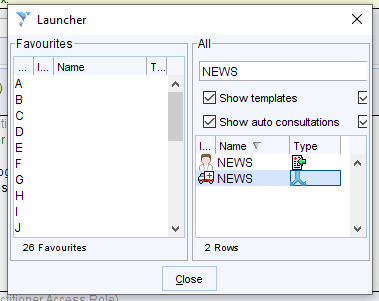
  • Manually via the S1 Launcher or by adding the protocol to a template or toolbar ((just hit F12 and search for ‘NEWS’: open the protocol option (blue arrow))
  • Automatically when adding patient observations if the NEWS2 Score reaches a threshold of >=5.
    • You can add observations using the template included or with your own/current template.
    • The NEWS2 template can be accessed by searching for ‘NEWS’ in the bottom left corner search bar:

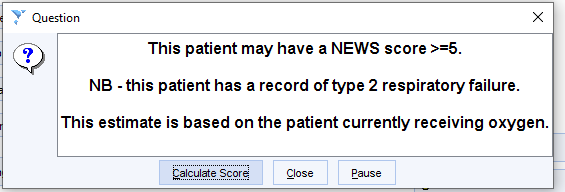
The automatic alert looks to see if the patient has a history of type 2 respiratory failure – if they do, it assumes the patient is on oxygen.  This will lead to a potentially oversensitive trigger in a very small number of patients with type 2 failure who are not on oxygen:

If further observations are required in order to calculate the score, the following prompt appears:
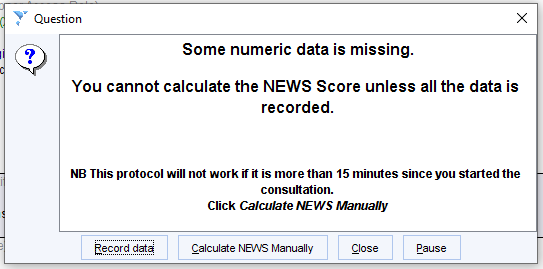

Click Record data to add any outstanding observations via the NEWS2 Template:
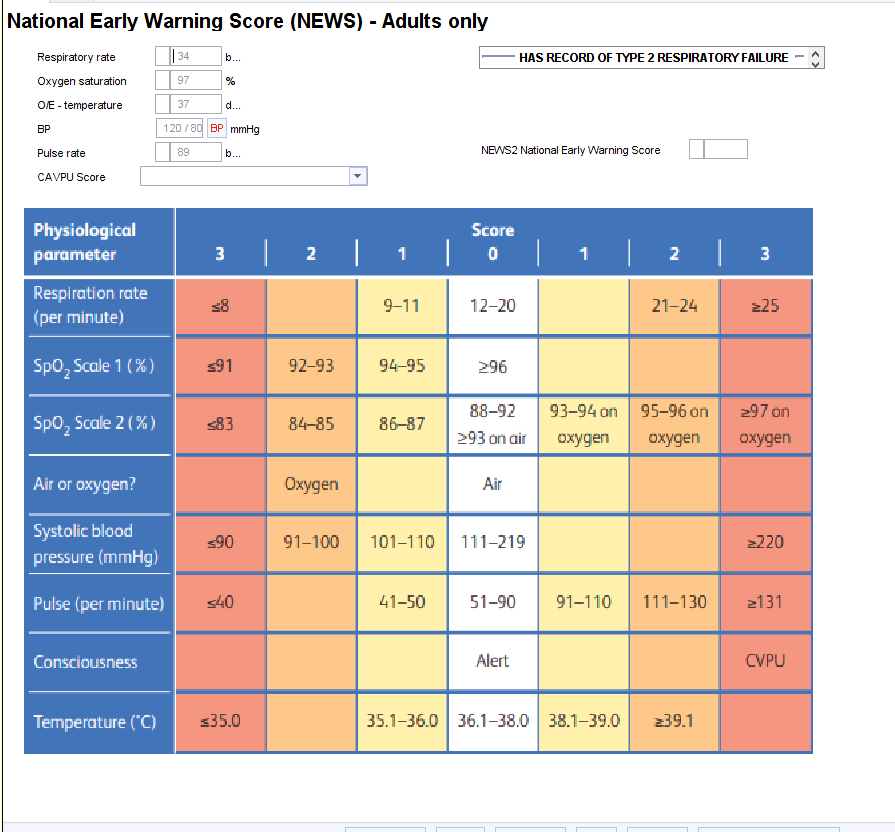
The observations must be recorded within 15 minutes of opening the patient record in order for the protocol to work. If a NEWS score is needed after that time, either start a new entry or use the table on the template to calculate the score manually.


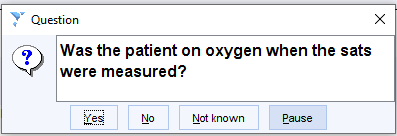
The protocol then asks whether the patient was on oxygen when observations recorded:
The NEWS2 score is then calculated and presented for verification before saving into the patient’s record:
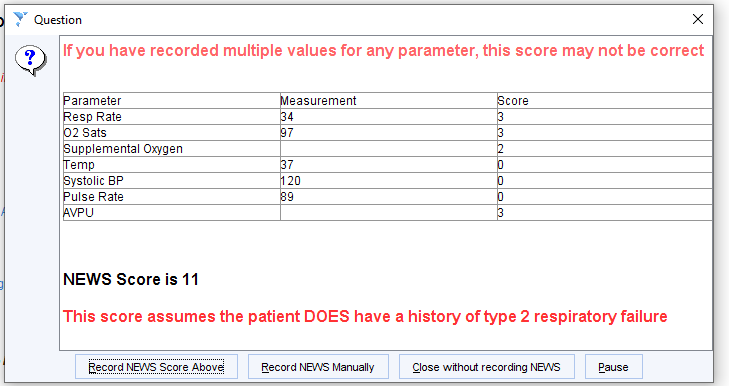

The scoring protocol checks to see if the patient has a record of type 2 respiratory failure.  If this is present it uses scale 2.  If it is absent, it uses scale 1.  When the final score is presented, the user is told if the score was calculated assuming T2RF or not, with the option to recalculate the score using the other state.


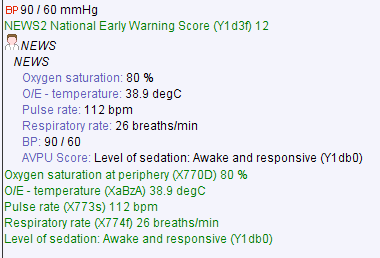
An entry is then created within the patient’s record:
Get in touch

If you have any questions regarding access, or the use of the CDRC Precision tools, please get in touch: contact-cdrc@healthinnovationnenc.org.uk

Footer

Follow us on social media

  • Facebook
  • LinkedIn
  • Twitter
contact-cdrc@healthinnovationnenc.org.uk
This website is operated by Health Innovation North East and North Cumbria. Suite A, 2nd Floor, 1 Citygate, Gallowgate, Newcastle upon Tyne NE1 4WH. Registered in England and Wales, Company Registration Number: 08727658
  • Terms of Reference
  • Privacy policy
  • Terms of use
  • Cookie Policy (UK)
  • Accessibility Statement

Copyright © 2025 Clinical Digital Resource Collaborative

Manage Consent
We use cookies to optimise our website and our service.
Functional Always active
The technical storage or access is strictly necessary for the legitimate purpose of enabling the use of a specific service explicitly requested by the subscriber or user, or for the sole purpose of carrying out the transmission of a communication over an electronic communications network.
Preferences
The technical storage or access is necessary for the legitimate purpose of storing preferences that are not requested by the subscriber or user.
Statistics
The technical storage or access that is used exclusively for statistical purposes. The technical storage or access that is used exclusively for anonymous statistical purposes. Without a subpoena, voluntary compliance on the part of your Internet Service Provider, or additional records from a third party, information stored or retrieved for this purpose alone cannot usually be used to identify you.
Marketing
The technical storage or access is required to create user profiles to send advertising, or to track the user on a website or across several websites for similar marketing purposes.
Manage options Manage services Manage {vendor_count} vendors Read more about these purposes
View preferences
{title} {title} {title}